Array Flatten in JavaScript
If you’ve ever opened a kitchen drawer only to find containers tucked inside other containers, you’ve encountered a "nested" structure. In JavaScript, we deal with the same thing in our data.
In this guide, we’ll learn how to take those messy, layered arrays and turn them into a clean, single line of data.
What are nested arrays?
An array in JavaScript is like a shelf that holds items. But what if one of those items is itself another shelf? That's a nested array — an array living inside another array.
Here's what one looks like in code:
// A simple flat array
const flat = [1, 2, 3];

// A nested array — arrays inside arrays
const nested = [1, [2, 3], [4, [5, 6]]];
The diagram below shows what [1, [2, 3], [4, [5, 6]]] actually looks like — boxes within boxes, each level representing a deeper layer of nesting.
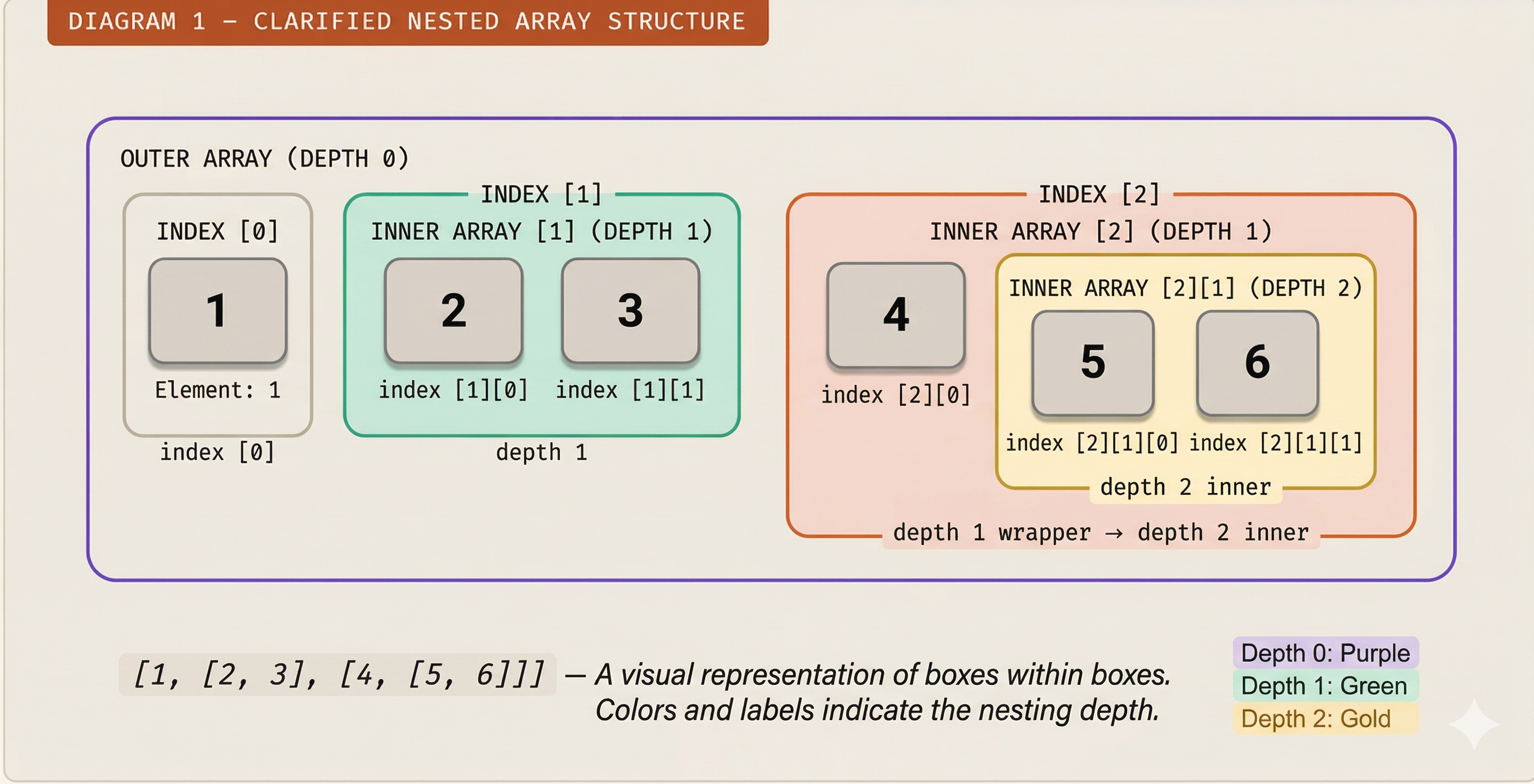
The key term here is depth — how many layers of brackets you have to open to reach an actual value. Depth 0 is the outermost array. Depth 1 is one level in. Depth 2 is two levels deep, and so on.
Why flattening arrays is useful
Real-world data is often structured in nested groups. Consider these everyday scenarios:
API response: You fetch orders from a server. Each order contains a list of items. You end up with
[[item, item], [item], [item, item, item]]— but you just want one list of all items.Search results: You query three categories and each returns an array of results. Merging them gives you nested arrays, but you need one flat list to display.
Matrix operations: A 2D grid (rows of columns) must be processed as a single sequence of values.
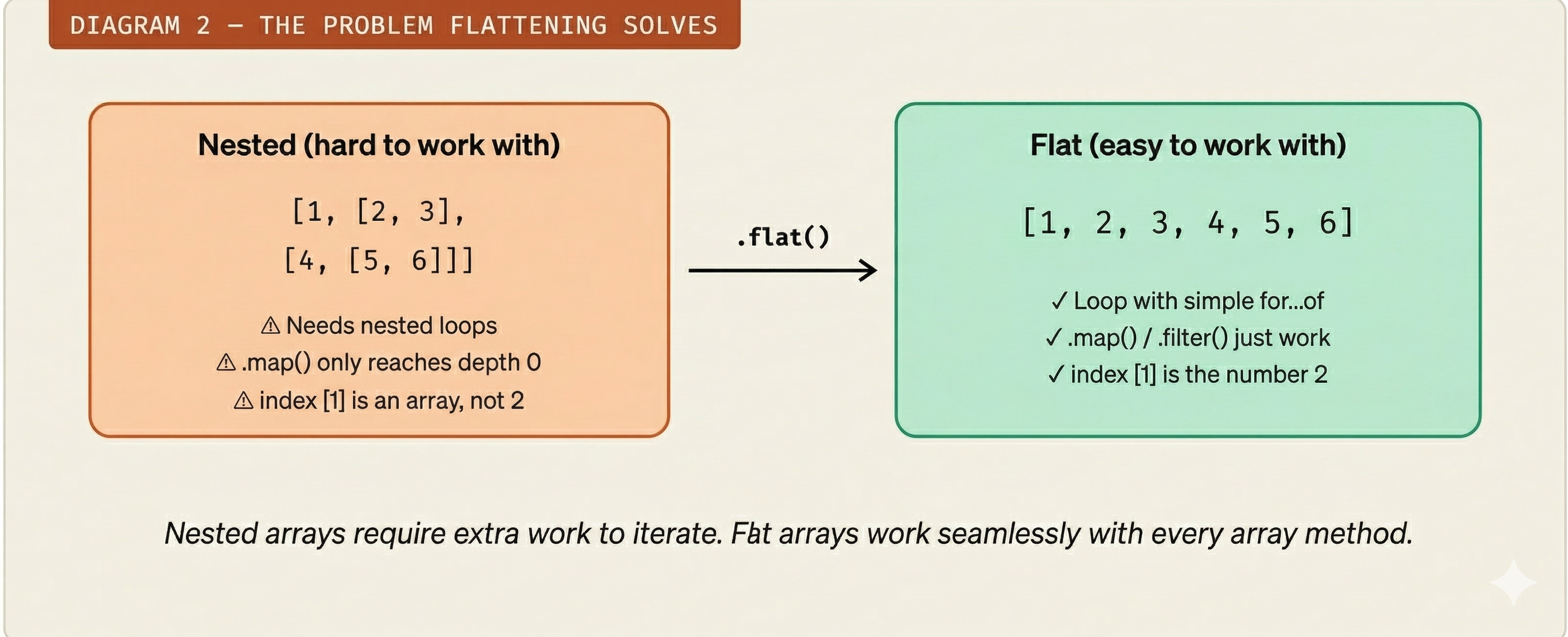
Flattening converts messy nested structures into a clean, linear array you can loop over, filter, sort, or display directly — without writing extra loops for every level of nesting.
The concept of flattening
Flattening means removing inner array brackets and pulling all values up into the outermost array. Think of it like taking every item out of every nested box and placing them all on a single tray — in order, left to right, depth first.
"Flatten = remove the brackets, keep the values, preserve the order."
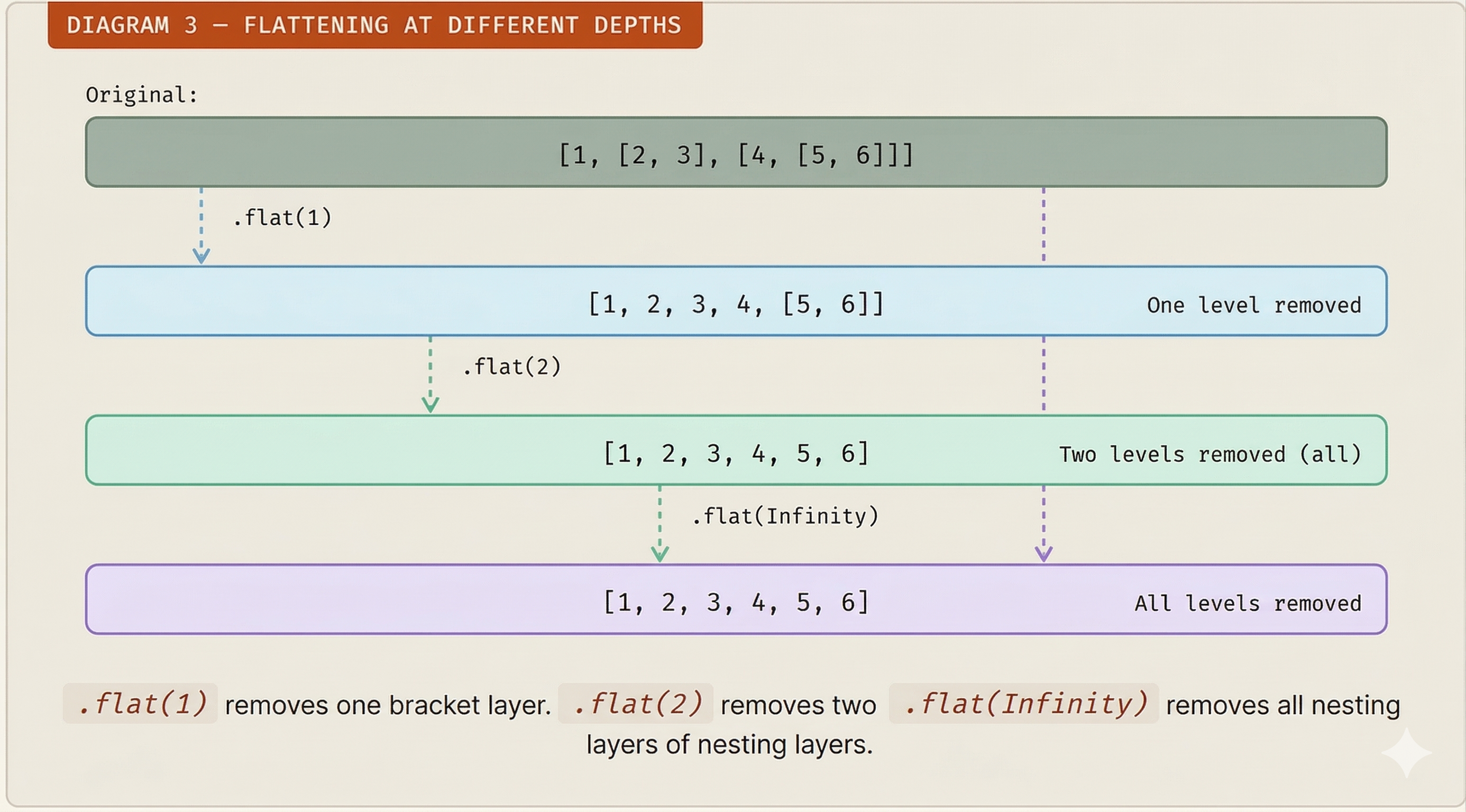
The key variable is depth — how many levels of nesting you want to remove:
Different approaches to flatten arrays
Method 1 — Array.flat() — the modern way
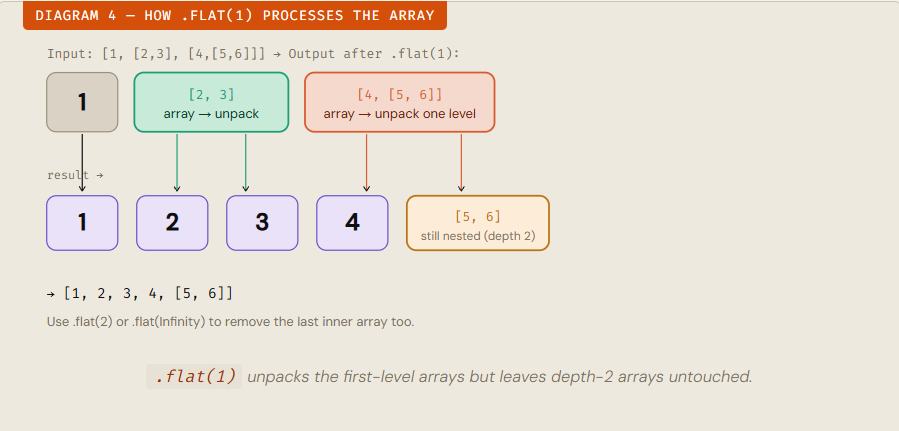
Introduced in ES2019, .flat() is the cleanest, most readable approach. It accepts a depth argument (default is 1).
const nested = [1, [2, 3], [4, [5, 6]]];

nested.flat();           // [1, 2, 3, [4, [5, 6]]]  → depth 1
nested.flat(2);          // [1, 2, 3, 4, [5, 6]]    → depth 2
nested.flat(Infinity);   // [1, 2, 3, 4, 5, 6]      → all levels
How it works step by step:
JavaScript visits each element of the outer array in order.
If the element is itself an array, it "unpacks" it — copying its contents into the parent array.
It repeats this unpacking process down to the depth you specified.
Values that are not arrays are copied as-is
Method 2 — flatMap() — transform and flatten
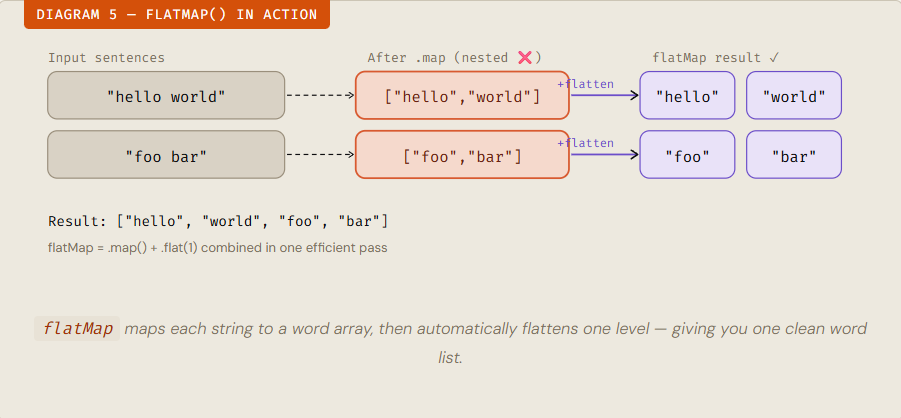
flatMap() is like doing .map() and .flat(1) in a single, efficient pass. Use it when you want to transform items and the result of each transformation is itself an array.
const sentences = ["hello world", "foo bar"];

// map alone gives a nested result
sentences.map(s => s.split(" "));
// [["hello", "world"], ["foo", "bar"]]  ← nested!

// flatMap flattens one level automatically
sentences.flatMap(s => s.split(" "));
// ["hello", "world", "foo", "bar"]  ← flat!
Method 3 — reduce() + concat() — the manual way
Before .flat() existed (pre-2019), developers used this pattern. It's valuable to understand because it reveals how flattening actually works under the hood.
const nested = [1, [2, 3], [4, 5]];

const flat = nested.reduce((acc, val) => acc.concat(val), []);
// [1, 2, 3, 4, 5]
Step by step what reduce does here:
Start with an empty accumulator
[].Visit
1→[].concat(1)→[1].Visit
[2,3]→[1].concat([2,3])→[1, 2, 3]. (concatspreads arrays automatically.)Visit
[4,5]→[1,2,3].concat([4,5])→[1, 2, 3, 4, 5].Limitation:
reduce + concatonly flattens one level deep. For deeper nesting you'd need to make it recursive (see Method 4).
Method 4 — Recursion — full depth control
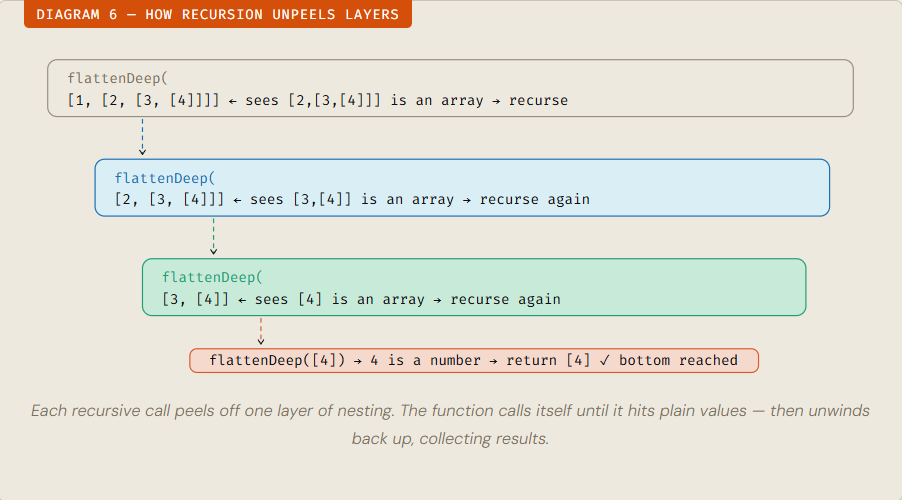
When nesting depth is unknown and you want complete control, write a recursive function. This is the most important approach to know for interviews.
function flattenDeep(arr) {
  return arr.reduce((acc, val) => {
    if (Array.isArray(val)) {
      return acc.concat(flattenDeep(val)); // recurse deeper
    } else {
      return acc.concat(val);              // it's a plain value
    }
  }, []);
}

flattenDeep([1, [2, [3, [4]]]]);
// [1, 2, 3, 4]
Quick comparison
| Method | Depth Control | Transform Items | Works without ES2019 |
|---|---|---|---|
.flat(n) |
Yes | No | No |
.flatMap() |
Depth 1 only | Yes | No |
reduce + concat |
Depth 1 only | Customizable | Yes |
Recursion |
Any depth | Customizable | Yes |
Common interview scenarios
Array flattening is a favourite interview topic because it tests recursion, array methods, and problem-solving thinking all at once. Here are the patterns you'll see most often.
"Flatten without using .flat()"
Write the recursive function from scratch. Key insight: check
Array.isArray(el)on each item and recurse into it.
"Flatten to a specific depth"
Add a
depthparameter and decrement it on each recursive call. Stop recursing whendepth === 0
"What does .flat() return?"
A new array — it does not mutate the original. Always mention immutability when discussing array methods in interviews.
"Handle unknown nesting depth"
Use
.flat(Infinity)or recursive function. Mention you'd verify depth is not insanely large to avoid stack overflow in production.
Interview pattern 1 — Flatten without .flat()
function flatten(arr) {
  let result = [];
  for (const item of arr) {
    if (Array.isArray(item)) {
      result = result.concat(flatten(item)); // recurse
    } else {
      result.push(item);
    }
  }
  return result;
}
Interview pattern 2 — Flatten to a given depth
function flattenToDepth(arr, depth = 1) {
  return arr.reduce((acc, val) => {
    if (Array.isArray(val) && depth > 0) {
      return acc.concat(flattenToDepth(val, depth - 1)); // go one level deeper
    }
    return acc.concat(val);
  }, []);
}

flattenToDepth([1, [2, [3]]], 1); // [1, 2, [3]]
flattenToDepth([1, [2, [3]]], 2); // [1, 2, 3]
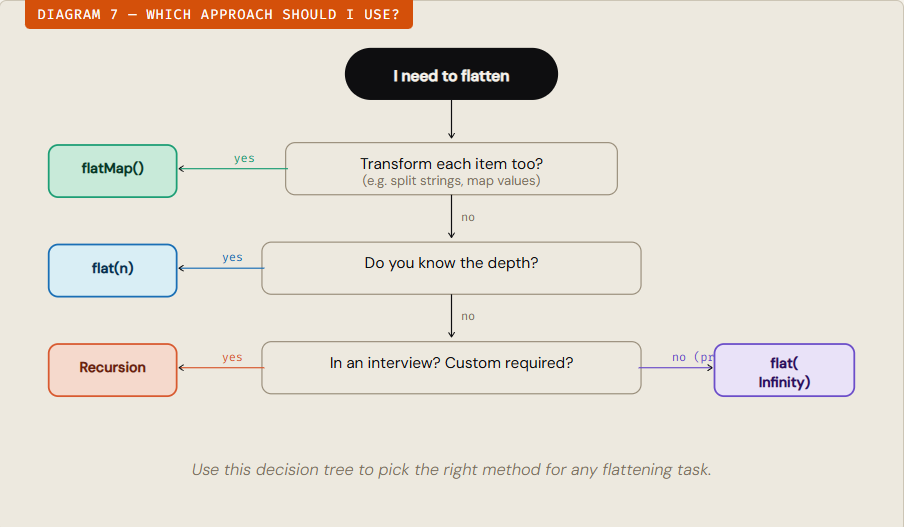
Interview mindset: Before writing code, always ask — "Do I know the depth? Do I need to transform values? Am I allowed to use built-in methods?" Interviewers reward candidates who think before they type.
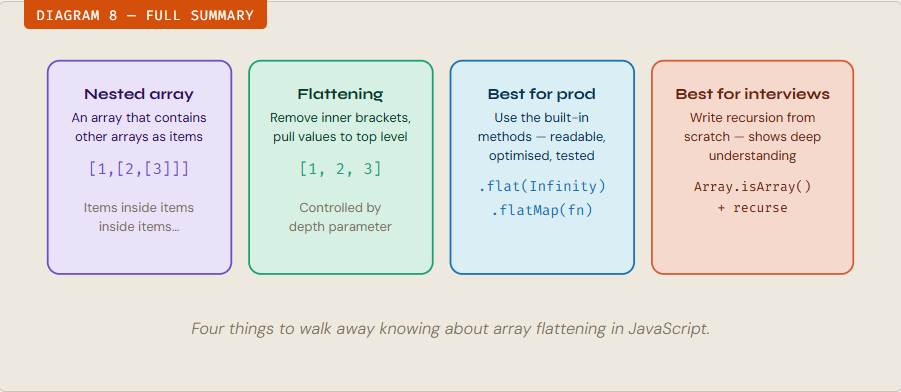
Key takeaways — at a glance